
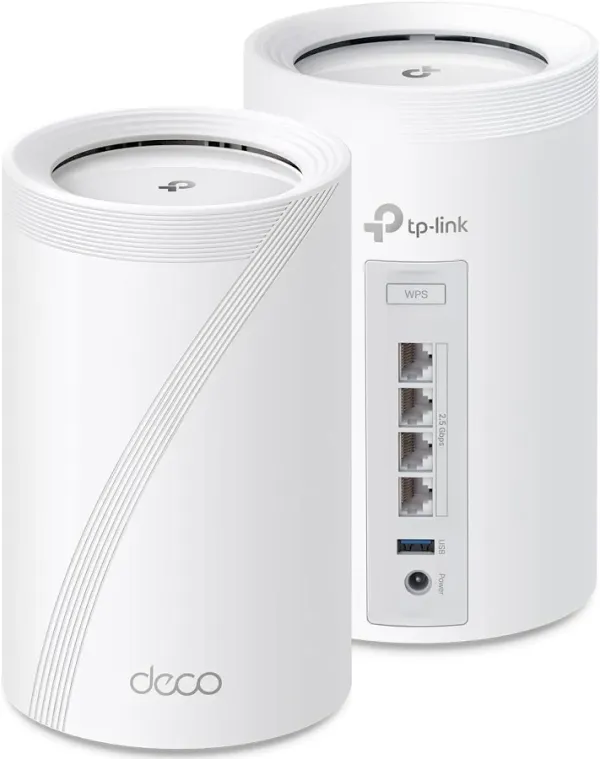
Our TP-Link Deco 7 Pro BE63 tri-band Wi-Fi 7 mesh system. We tested it across the property with older Deco S4 nodes in outbuildings and Starlink as the ISP.
We’ve got a few acres around here, and getting Wi-Fi to reach every corner of it has been a project. I wanted cameras outside, good coverage in the house, and something that could handle being spread across the property without a bunch of dead spots. The TP-Link Deco 7 Pro BE63 is what I settled on for the main house nodes, and after setting them up with some older Deco S4 units I already had in the outbuildings, I’ve got Wi-Fi across roughly three acres with no dead zones inside the house. Here’s how it’s been working.
What It’s Built For
The Deco 7 Pro BE63 is TP-Link’s mid-range Wi-Fi 7 mesh system, sitting above the entry-level dual-band Decos and below the Elite BE85/BE95 with their 10 GbE ports and bigger price tags. It’s a tri-band system running on 2.4, 5, and 6 GHz, with a combined theoretical throughput of around 10 Gbps. In real terms, that means it can handle multi-gig internet connections, heavy streaming, multiple devices, and Wi-Fi 7 features like MLO (Multi-Link Operation) and 4K-QAM when your clients support them.
Each node has four 2.5 GbE auto-sensing ports and a USB 3.0 port. That’s more wired throughput than most mesh systems in this price range offer, and it matters if you’ve got a NAS, a gaming console, or a wired backhaul in the walls. The nodes are identical cylinders, so a 2-pack or 3-pack gives you the same hardware across every unit. No master-slave downgrade on the satellite ports.
Design and Build
The nodes are white cylinders, about 4.2 inches wide and 7 inches tall. They’re not small, but they blend into most rooms better than a spider-shaped router. Each one has a color-changing LED at the base that tells you the connection status at a glance. Blue for good, yellow for fair, red for issues. I’ve got mine placed near windows in the house, which helps with the signal reaching the outbuildings, and they look fine sitting on a shelf or side table.
There’s no fan inside, which is worth noting. The BE63 runs silent, unlike some of the higher-end Wi-Fi 7 mesh units that need active cooling. The build quality feels solid for the price point. The plastic has a matte finish that doesn’t show dust as badly as glossy gear, and the ports are well-spaced so you can actually plug in four Ethernet cables without fighting for room.
The power is a wall wart adapter, not PoE, which is fine for indoor use. If you’re putting these in a workshop or garage, you just need a nearby outlet.
Performance in the Field
I’ve got the Deco 7 Pros set up in the house, positioned near windows to help push the signal outside. Then in the powered outbuildings, offices, sheds, and workshops, I put the older Deco S4 units I already had. The S4s are AC1200 dual-band, so they’re way slower than the BE63s, but for security cameras and basic web access in a workshop, they do the job. And the best part is that TP-Link’s mesh system handles this mix without any fuss. You just add the S4s as satellite nodes in the same Deco app, and the mesh manages the handoff.
The result is Wi-Fi across about three acres with no dead spots in the house. The signal drops off as you get further into the treeline, but within the usable area around the buildings, it’s consistent. If you’re on a rural property without Ethernet in every building, being able to mix a few older Deco nodes into the same mesh saves you from having to buy all-new hardware for every outbuilding.
The Deco app made the initial setup easy. Plug in the main node, download the app, and the wizard walks you through it. Connecting to the Starlink router was the one part that took a little figuring out. You’ve got a choice between running the Starlink in bypass mode and letting the Deco handle routing, or keeping the Starlink as the router and putting the Deco in AP mode. Neither is hard, but it’s worth knowing which you want before you start. Once you’re past that decision, the rest is smooth.
Where It Falls Short
The biggest hardware limitation is the lack of 10 GbE. If you’ve got a fiber connection faster than 2.5 Gbps, or you’re running a local network with 10 GbE switches and NAS, the BE63 becomes the bottleneck. The Deco 7 Elite with its 10 GbE and SFP+ ports is the upgrade path for that use case, but it costs significantly more.
There is some uncertainty with TP-Link in the future with the FCC Rule on routers this year so keep that in mind. The app-centric management is another thing to be aware of. You need a TP-Link account and the Deco app to do anything beyond basic setup. The web UI is limited, and some of the more useful features like advanced parental controls and security scanning are in the HomeShield subscription tier. The free tier covers the basics, but it’s a gotcha if you assumed everything was included.
And the Starlink thing again. It’s not a dealbreaker, but the whole bypass-versus-AP decision is something you need to understand before you buy. The TP-Link documentation covers it, but it’s not the kind of detail you’d stumble on during setup.
Who Should Buy This
This system makes the most sense if you’ve got a multi-gig internet connection, a house with coverage issues, or a property where you want to mix and match Deco nodes across different buildings. The ability to keep older Decos as satellites while putting the faster hardware where it counts is a real advantage if you’re already in the ecosystem.
If you’re on a fiber connection under 2.5 Gbps, or even a good cable connection, the BE63’s ports won’t be your bottleneck. The Wi-Fi 7 features are future-proofing more than a necessity right now, since most clients are still on Wi-Fi 6 or 6E. But the system handles Wi-Fi 6 gear perfectly fine, and when you upgrade your phone or laptop, the MLO and 6 GHz band will be there.
If you need 10 GbE, or you want a system that doesn’t require an app and an account, look at the Deco Elite line or some of the prosumer setups. But for the price, especially at the street pricing these have been hitting in 2026, the BE63 is hard to beat.
Bottom Line
The TP-Link Deco 7 Pro BE63 is a solid Wi-Fi 7 mesh system that delivers on the things that actually matter for a property-wide setup. The 2.5 GbE ports on every node, the easy Deco app, and the ability to mix in older Deco models make it a flexible pick that scales with what you already have. The lack of 10 GbE and the app-required management are real tradeoffs, but at the price these are going for, you’re getting a lot of capability for the money. If you’re looking to upgrade from a single router or an aging mesh setup and want something that will actually cover the whole property, this is worth a serious look.